Bitcoin.com: Crypto Wallet
- 4.6
- Rating
- 10.00M
- Installs
- Free
- Price
 Analysis by App-foxy
I approached Bitcoin.com: Crypto Wallet as an everyday finance app rather than as a simple place to look at cryptocurrency prices. That distinction matters. A wallet can be convenient when you need to hold digital assets, buy or sell them, or move them between services, but it also puts more responsibility in your hands. In my experience, this app is most appealing when you want a self-custody wallet with several common assets in one mobile interface, not when you want a traditional bank account or a completely hands-off investment product.
The app comes from Bitcoin.com Developer and is free to install. It has built a substantial audience, with over ten million installs and an average rating of 4.6 from around eighty-seven thousand ratings. Those numbers do not remove the need for caution, especially in crypto, but they do suggest that the app has become a familiar option for people who want to manage digital currency from a phone. It is rated for Everyone, and the current version is 9.35.1 for devices running Android 8.0 or later.
How the wallet feels in current everyday use
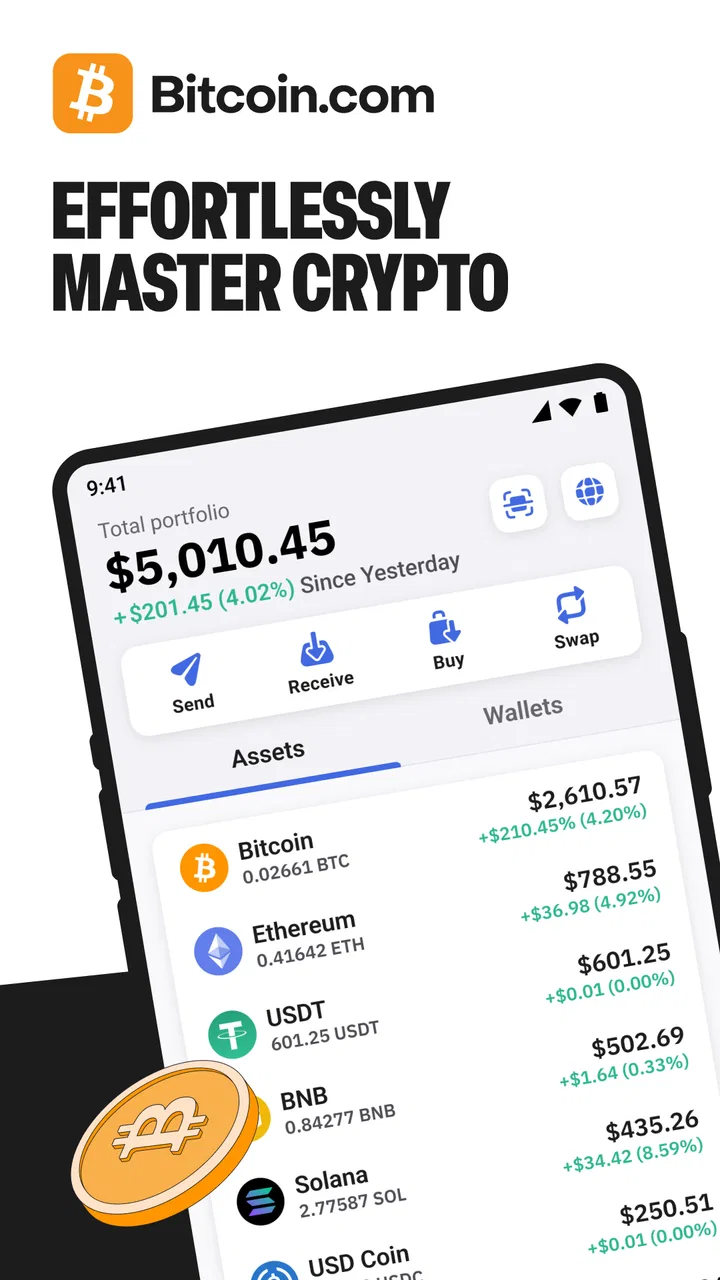
The main appeal is the combination of self-custody and convenience. Instead of leaving every asset inside an exchange account, I can use the wallet as a place where I control access to my funds. At the same time, the app is designed around practical actions: buying, selling, swapping, and managing assets such as BTC, ETH, and USDT. That makes it more approachable than a wallet that expects me to understand every technical detail before I can complete a basic transaction.
You May Also Like

 Blood Strike: 2.5 Anniversary
Blood Strike’s Loadouts Turn Every Drop Into a Tactical Gamble
A close look at Blood Strike’s custom loadouts: how fast access to signature weapons reshapes its battle royale rhythm, rewards preparation, and narrows the gap between fights.

 Pandora - Music & Podcasts
Pandora’s Music Is Easy to Start, but Harder to Recover
Pandora’s strength is its low-effort path from a seed to a station. Its weak spot is how much confidence it asks you to place in connection, setup, and quiet recovery.

 8 Ball Pool
 Is Built on Rivalries, Rematches, and Routine
A close look at the rivalries, rematches, shared routines, and unanswered safety questions that turn a quick pool match into a persistent mobile community.

 Samsung Music
’s Quiet Strength Is Playing What You Already Own
Its reach comes less from spectacle than from dependable access to a personal library. That simplicity is both the app’s strongest retention engine and its ceiling.

 AccuWeather: Weather Radar
AccuWeather Review: A Quick, Clear Forecast for Everyday Decisions
For everyday plans, the best forecast is the one you can understand quickly. AccuWeather makes rain timing, radar, and local conditions easy to act on, with a few trade-offs.

 Hill Climb Racing
Why Hill Climb Racing Still Turns Crashes Into One More Run
A tiny car, a bumpy hill and one more upgrade: Hill Climb Racing keeps resurfacing because its simple chaos makes every near-miss feel personal.
More From Our News Desk



Self-custody is also the point where a new user needs to slow down. With a conventional banking app, a forgotten password can usually be handled through a familiar recovery process. A self-custody wallet works differently: the recovery information connected to the wallet is critical, and I would never treat it like an ordinary login detail. I would write down the recovery information carefully, keep it offline, and avoid storing it in a screenshot, chat, or easily accessed note. The app can make transactions easier, but it cannot make careless backup habits safe.
The interface is most useful when I already know what I am trying to do. For example, if I receive a payment in one supported asset and later need another, having buying, selling, and swapping tools in the same wallet reduces the need to jump between several apps. That saves time and lowers the chance of copying an address into the wrong service. Still, convenience should not be confused with a guaranteed best rate or the lowest possible cost. Before approving a purchase or swap, I would inspect the final amount, any displayed charges, and the network involved.
A realistic use case is a freelancer who receives a cryptocurrency payment, keeps part of it in the wallet, and later converts a portion for ordinary spending. The app can fit that workflow because it brings storage and conversion into one place. I would still keep a record of transactions for personal accounting and taxes, since a wallet is not automatically a complete financial recordkeeping system. It is also wise to test a small transfer first when sending to a new address, particularly if the recipient uses a different network or asset format.
What the current version means for practical use
Version 9.35.1 is the version I would evaluate today, rather than assuming that an older review describes the present experience. Apps in this category change frequently because operating systems, payment providers, supported assets, and security expectations keep moving. The version number itself does not prove that every part of the app has changed recently, but it does give existing users a useful reference point when checking whether their installation is current.
For someone upgrading from an older installation, I would first make sure the wallet backup is available before updating or changing phones. That is a sensible precaution with any self-custody wallet, regardless of how smooth the update process appears. I would also verify that the balances and asset names look correct after the update, and I would avoid making a large transfer immediately after installing a new version. A small test transaction is a better way to confirm that the destination, network, and wallet state are all behaving as expected.
The app has been available since June 19, 2017, so it is not a brand-new experiment. That longer presence helps explain why it may feel more complete than a narrowly focused wallet built around one asset or one exchange. At the same time, longevity is not a substitute for checking current behavior. Crypto products evolve through interface changes and service changes, and an action that feels familiar can still require a fresh look at its confirmation screen.
Buying, selling, and swapping without losing focus
The integrated trading tools are useful for reducing friction, especially for a person who does not want to transfer funds to a separate exchange for every small conversion. I like the idea of being able to move from holding an asset to swapping it without leaving the wallet context. It is a more direct workflow than maintaining separate apps for storage, exchange, and receiving payments.
There is an important trade-off, though. A built-in swap or purchase flow is optimized for convenience, while an experienced trader may care more about order types, market depth, advanced charts, or precise execution controls. This wallet is not the first choice I would make for active trading. Someone who places frequent orders or compares several markets may be better served by a dedicated exchange, then moving only the amount intended for longer-term self-custody into a wallet.
I would also distinguish between an on-chain transfer and an in-app conversion. Sending an asset to another wallet can involve network fees and irreversible mistakes. Swapping inside the app may involve a different pricing structure and may not behave like a traditional exchange order. Before confirming either action, I would check the asset, the destination or receiving asset, the estimated amount, and the network. That short pause is one of the most valuable habits a mobile crypto user can develop.
Where it helps newcomers and where it demands discipline
For a beginner, the biggest benefit is having a recognizable set of actions in one place. The app does not force the user to begin with a complicated desktop setup, and its finance category makes its purpose clear. The Everyone age rating also makes it broadly accessible from a store perspective, although that should not be mistaken for a promise that cryptocurrency is suitable for every age or financial situation.
I would introduce it to a friend who wants to learn the basics of holding and moving digital assets, provided that friend understands the difference between a wallet and an exchange account. I would recommend starting with a small amount, learning how the backup works, and practicing a modest receive-and-send flow before adding more funds. The most common beginner mistake is treating a wallet address like a bank account number that can be reused without checking. I would copy and verify the address, confirm the network, and use a small test amount whenever the situation is unfamiliar.
The app is less suitable for someone who wants guaranteed recovery through customer support, automatic investment management, or a traditional fraud-reversal process. It is also not ideal for a person who finds seed phrases, network fees, and irreversible transfers too stressful. In that case, a regulated financial service or a custodial exchange may feel easier, even though it introduces a different set of risks and dependencies. The right choice depends on whether control or simplicity matters more to the user.
What has improved over time, and what still deserves attention
The clearest sign of product evolution is not a single headline feature but the way this wallet has continued as a multi-purpose mobile finance tool. Its current identity covers more than holding Bitcoin. The ability to work with BTC, ETH, USDT, and other assets, alongside buying, selling, and swapping, gives it a broader role than a single-coin wallet. For existing users, that can mean fewer separate workflows and less need to move funds between unrelated applications.
That broader scope can also make the app harder to reason about. Every added asset and transaction path creates another opportunity to select the wrong network or misunderstand the final cost. I would prefer to see the app as a toolbox, not as a reason to turn every available feature on at once. New users should learn receiving and backing up first, then explore conversions only after they understand what each confirmation screen is showing.
One non-obvious advantage of a multi-asset wallet is that it can make personal organization easier. I can separate the purpose of funds by asset or by wallet rather than mixing every transaction into one account. For example, I might use one wallet for small experimental transfers and another for funds I intend to hold longer. That approach requires careful labeling and secure backups, but it can reduce confusion when reviewing activity later. I would never create extra wallets casually without documenting how each one is backed up.
Another useful habit is to treat the first transaction to a new service as a compatibility test. A recipient may display an asset name that looks correct while expecting a particular network. I would compare the receiving instructions character by character, confirm the network on both sides, and send a small amount first. This is especially important when using a wallet that supports several assets, because similar names do not guarantee interchangeable destinations.
The remaining gaps are mostly about expectations. A convenient mobile wallet cannot remove market volatility, network congestion, or the consequences of sending funds to the wrong address. It also cannot automatically make every swap competitive with every specialist service. I would like users to approach the app with the same care they would use for any financial tool: review the details, keep records, protect access, and avoid committing money they cannot afford to lose.
How it compares with familiar alternatives
Compared with a custodial exchange, this wallet gives self-custody a more central role. That can be a meaningful advantage for users who want direct control rather than leaving all assets under an exchange account. The downside is that the user carries more responsibility for backup and transaction accuracy. An exchange may feel simpler for frequent trading, while this wallet makes more sense for people who want a personal mobile wallet with conversion tools attached.
Compared with a hardware wallet, the phone-based approach is faster for small everyday actions and easier to carry. A hardware device can be more attractive to someone protecting a larger long-term balance and willing to accept extra setup and cost. I would not use the convenience of a phone wallet as an argument to keep every asset there. For larger holdings, a user should think carefully about their security model and whether a separate storage method is more appropriate.
Compared with a single-asset wallet, the multi-asset design is more flexible, particularly for people who use BTC, ETH, USDT, and other supported currencies in different situations. The price of that flexibility is a busier decision-making process. A focused Bitcoin wallet may be easier for someone who only receives and sends Bitcoin and wants fewer choices. Bitcoin.com: Crypto Wallet is more useful when the user values breadth and integrated actions over a minimal interface.
Questions I would settle before installing it
The first question is whether the app is free. It is free to install, but that does not mean every financial action is free. Purchases, sales, swaps, and transfers can involve costs that depend on the transaction and service involved. I would always read the final confirmation rather than assuming that the absence of an installation charge means there are no transaction-related costs.
The second question is whether it can replace a bank account. It cannot. This is a cryptocurrency wallet, not a conventional account for deposits, bills, salary payments, or guaranteed balances. It may support a useful part of a digital-asset workflow, but I would keep ordinary banking and emergency savings arrangements separate.
The third question is whether it is suitable for a complete beginner. My answer is yes, but only with a small starting amount and a willingness to learn the recovery process. The interface can make actions approachable, yet the underlying transactions remain consequential. I would not recommend beginning with a large purchase simply because the buttons are easy to find.
The fourth question is whether existing users should update. In general, I would keep the app current, but I would prepare first: confirm the backup, update through the normal device channel, reopen the wallet, and check the displayed assets before sending anything. If the phone is old or storage is limited, I would make sure the device can complete the update reliably rather than interrupting it midway.
The final question is what to watch going forward. I would pay attention to how clearly the app presents fees, networks, supported assets, and recovery guidance as its feature set develops. Those details matter more to me than adding another button. A wallet earns trust when it makes the risky parts of a transaction difficult to overlook.
My recommendation for the right kind of user
I see Bitcoin.com: Crypto Wallet as a practical middle ground: more flexible than a single-purpose wallet, more self-directed than a custodial exchange, and easier to carry than dedicated hardware. Its strongest use case is a person who wants to buy, sell, swap, and hold several digital assets from a phone while accepting responsibility for wallet security.
I would recommend it to a careful newcomer, a casual crypto user, or someone who wants a single mobile home for several common assets. I would skip it for active traders who need advanced market tools, for users who want bank-like recovery, and for anyone unwilling to manage backup information responsibly. The app can simplify the mechanics, but it cannot simplify the risk away.
My final advice is to start small, verify every network and address, keep the recovery information offline, and compare the final transaction details before confirming. Used that way, this free finance app offers a sensible entry point into self-custody. The most important feature is not the number of actions it puts on the screen; it is whether I use those actions slowly enough to remain in control.
FAQs for Bitcoin.com: Crypto Wallet
01What is Bitcoin.com: Crypto Wallet used for?
Bitcoin.com: Crypto Wallet is a non-custodial cryptocurrency wallet designed for managing digital assets such as Bitcoin, Bitcoin Cash, Ethereum, and other supported tokens. After setting it up, users can receive, store, send, and monitor cryptocurrency from a mobile device. It also provides access to market information and additional crypto services, although availability may vary by country and asset.
02Is Bitcoin.com: Crypto Wallet safe to use?
The wallet gives users control of their recovery phrase and private keys, which means the company generally cannot restore access if those details are lost. During testing, the app included standard security measures such as wallet backup guidance and device-based protection options. However, safety depends heavily on the user: never share the recovery phrase, avoid suspicious links, and consider using a secure device and strong authentication.
03Does Bitcoin.com: Crypto Wallet charge fees?
Downloading and creating a wallet is generally free, but using cryptocurrency networks involves transaction fees that are not controlled entirely by the app. Fees can change depending on network congestion, the selected asset, and transaction conditions. Additional costs may apply when buying, selling, swapping, or using third-party payment services. Review the final transaction details carefully before confirming any operation.
04Can beginners easily use Bitcoin.com: Crypto Wallet?
The app is aimed at both newcomers and experienced cryptocurrency users. Its interface presents common actions such as receiving, sending, and viewing balances in a relatively straightforward way, while explanatory prompts help during initial setup. Even so, beginners should understand basic concepts such as wallet addresses, network selection, confirmations, and recovery phrases before transferring real funds, because cryptocurrency transactions are usually irreversible.
05What happens if I lose my phone or forget my recovery phrase?
Your wallet can usually be restored on another compatible device only if you have correctly backed up the recovery phrase or other supported recovery information. Losing the phone itself does not necessarily mean losing the funds, provided the backup remains private and available. If the recovery phrase is forgotten, deleted, or exposed to someone else, Bitcoin.com may not be able to recover or protect the wallet.
Pros
- Supports Bitcoin
- Bitcoin Cash
- and several other cryptocurrencies
- Non-custodial design gives users control of their private keys
- Built-in buying
- selling
- swapping
- and sending tools
- Simple interface suitable for beginners entering crypto
- Includes price tracking and portfolio management features
Cons
- On-ramp availability and fees vary by country and payment method
- Crypto transactions can be irreversible if an address is entered incorrectly
- Some advanced features may require identity verification
- Network fees can change and are not always predictable
- Users are responsible for securely backing up recovery phrases

Bitcoin.com: Crypto Wallet
Gallery